Michelle Pena
-
Posts
371 -
Joined
-
Last visited
Everything posted by Michelle Pena
-
Damien I signed up for the Raw class but while reading the the first section I remembered I took the bridge class , signed up again for the $6 refresher and I can't access it ? I guess it's past that time? I'd like to go over Bridge again as you mention before the Raw class. Thanks!
-
I will try the auto WB and see how that works out and take the Raw Class.I mostly use Sigma lenses and I wish it would give my images a warmer feel but I get a lot of cool tones. When using the AWB as you suggested , I don't need to set the green/magenta bar correct?
-
Yes, I've been needing to take this class for a while now, a long while now lol!
-
I do like the Adobe color for the D850 it seems to work better than the standard. Forget the other option vivid was just horrible. The standard did work for the D750 though. This camera I can't seem to understand it and I'm about to give up and go back to my D750. The D850 is defiantly a beast.
-
I've had my D850 for over a year now and I'm not loving the colors. I loved the colors on the D750 a lot better. I'm also finding the camera is contrasty. I guess my question is , is there anything I can do setting wise to improve color? I shoot kelvin between-5000 to 5600k, is this too cool for this camera? and the green /magenta bar I have set at 0.0. It seems to be ok for outdoor images but my indoor images with a strobe geez colors are so dull and having to do more editing than I did with the d750. I even recalibrated my iMac to make sure it needed to be calibrated but my iMac pretty stays the same when calibrated. Any suggestions? Not sure you can help if you don't shoot indoor strobe? Thanks!
-
Hello Brian, I've been receiving email from Calibrite about this color checker device, do you know about this and would I need it for the iMac ? Another question do you have a section here where I an ask questions about the D850? I have a question about the WB? Would it be under the gear talk section?
-
Prints are coming back red.
Michelle Pena replied to Michelle Pena's topic in Monitor calibration questions or problems
OK, so as you said, it's a bad batch. I think they need to warmed up though.Baby is so pale that when I up the warmth he looks kinda saturated LOL Thank you. -
Prints are coming back red.
Michelle Pena replied to Michelle Pena's topic in Monitor calibration questions or problems
Yes I just didn't;t know if it would be accurate.
-
Prints are coming back red.
Michelle Pena replied to Michelle Pena's topic in Monitor calibration questions or problems
Would it be possible to send you two raw files on a session I'm working on? To see if you see red? make sure its' not me lol I don't mind paying a fee. I mean Psd file. -
Prints are coming back red.
Michelle Pena replied to Michelle Pena's topic in Monitor calibration questions or problems
lol ok I did panic, but I'll send for another set. Thank you. -
Prints are coming back red.
Michelle Pena replied to Michelle Pena's topic in Monitor calibration questions or problems
Oh dear, I'm not sure if I should trust it Maybe talk to WHCC again? And ask them to send another set of test prints? -
Prints are coming back red.
Michelle Pena replied to Michelle Pena's topic in Monitor calibration questions or problems
I just compared another pink one and it matched , so 4 prints of 6 are matching -
Prints are coming back red.
Michelle Pena replied to Michelle Pena's topic in Monitor calibration questions or problems
Yes I believe so , it's been a long time.i just compared a few more and those still matched -
Prints are coming back red.
Michelle Pena replied to Michelle Pena's topic in Monitor calibration questions or problems
ok I compared one that had browns and creams and those two images matched. Then I compared two that had pink and yellow those did not match and the screen did look red in just those to colored images. The cream images I didn't see any red on the screen. ugh. -
Prints are coming back red.
Michelle Pena replied to Michelle Pena's topic in Monitor calibration questions or problems
Yes I do have those. -
So I have not had an issue ever with color on my iMac it has always been brightness lol Anyway, I had the lab print a set of test prints with no color correction of course then I also had them send me a set of color corrected prints. My test prints look red compared to the color corrected ones. Now I didn't notice it until I compared the two other wise I would have never seen the reds in the prints. to me they "looked fine" . Does the monitor need to be calibrated and adjust color or do you think I need to adjust reds in ACR? I've already tried that but it seems when I take out reds it looks green then I come back to reds and then test prints come back red anyway as if I never adjusted them. I use WHCC , I know not everyone's favorite. Thank you for any advise. Michelle
-
Got it! So far ACR is still in the sRGB space but I'll keep watch every time I open. Is the 2021 version a huge program. I mean my iMac is about two years old but still would not want it to slow down. Just curious though!
-
Ok, thanks, I really was interested in how the sky enhancement works with the new version. I forget about how you can downgrade! I may give it a try, I'm so indecisive lol So , when upgrading or downgrading make sure to follow the trouble shooting for the colors space correct ? It doesn't keep the settings .
-
Hello Brian. I hope it's ok to ask this here. I don't know why I can't access " ask Damien " ?? Does the 2021 version of PS CC have any glitches ? Is it ok to upgrade? I don't have Big sur I am on Mojave 10.14.6 Thank you for any help.
-
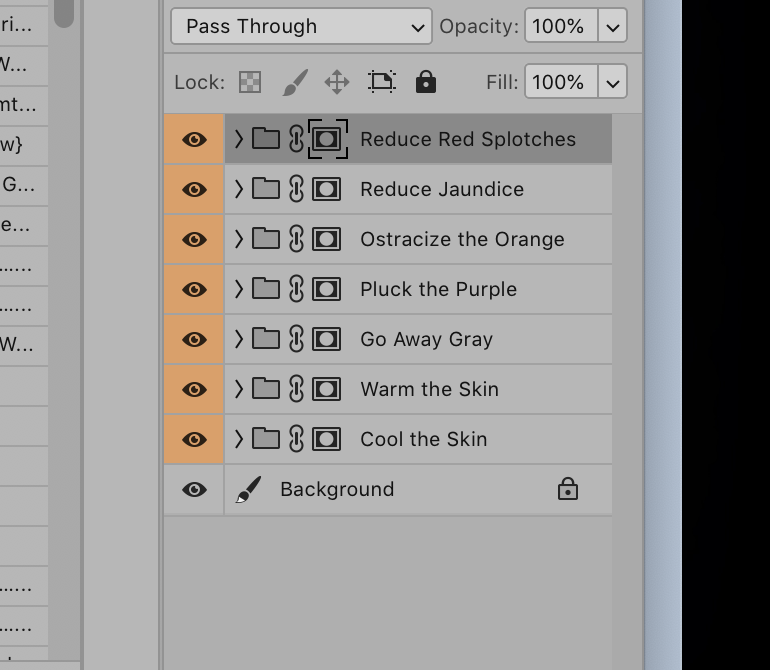
Hello Brian, I installed the Wacom tablet, then decided I did not like it.Uninstalled it and now my action icons look like this ( picture attached ) Not just actions even adjustment layers icons. I refreshed workspace and uninstalled and reinstalled actions and it"s still looks like this. I use version 2019 20.0.10 Know of anything I can do ? Is this a iMac issue.I'm on Mojave 10.14.6. Thank you for any help
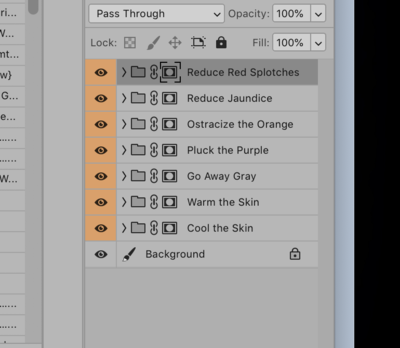
-
I noticed my iMac is just a tad slower
Michelle Pena replied to Michelle Pena's topic in The Macintosh User Group
Done! It said my iMac should run smoother lol Thanks so much ! -
I noticed my iMac is just a tad slower
Michelle Pena replied to Michelle Pena's topic in The Macintosh User Group
Ahh ok well I already have dng on EHD so then I can remove those. Yes after clearing out the downloads and the documents folder( this folder was taking up most space) and running CMM it runs a lot smoother even photoshop seems faster although I didn't see much slowness there. Maybe that's in my head ha! Thank you in advance for the screen shots of CMM. There is a lot of options to clean ! -
I noticed my iMac is just a tad slower
Michelle Pena replied to Michelle Pena's topic in The Macintosh User Group
Yes I think so...Can I delete the item from when I downloaded the new app Cleanmymac? I just purchased it and it has a file from it in the downloads folder. I never know what to do with those. Any suggestions on what to run on the Cleanmymac? I think I did all three and a deep clean as well. -
I noticed my iMac is just a tad slower
Michelle Pena replied to Michelle Pena's topic in The Macintosh User Group
Thank you I will be purchasing the Cleanmymac. When cleaning out the downloads folder and they are files I still need , should I place them in another folder ? Doesn't make sense to cause it will clutter up that space anyway? I had one psd folder on my desktop and now I am removing it. I just purchased a new external hardrive. My PS and ACR have been running normally. -
I have a Mac desktop running Mojave 10.14.6 and Photoshop 2019. It is under 2 years old, and has 16GB of RAM. Its hard drive has 108.51GB free out of 250.69GB. The last time I shut down was more than 24 hours ago. I have never run a cleanup program. It could be almost 3 years old.