Damien Symonds
-
Posts
210,959 -
Joined
-
Last visited
-
Days Won
3,442
Everything posted by Damien Symonds
-

Editing video
Damien Symonds replied to Jennifer Casalegno's topic in Miscellaneous questions or problems
It must be, but I don't know anything about video, sorry -
Right.
-
About Lisa Visser's Editing Style again
Damien Symonds replied to MissFrog's topic in How to achieve a certain look or effect
I don't know, sorry -
About Lisa Visser's Editing Style again
Damien Symonds replied to MissFrog's topic in How to achieve a certain look or effect
The PSD file is linked right there in the thread. Did you download it? -
Recreating Lisa Visser's Editing Style
Damien Symonds replied to tiffo27t's topic in How to achieve a certain look or effect
Yep! https://www.damiensymonds.net/channel-mixer-class -
No I didn't The Levels Class is the only one that genuinely changes lives, and you haven't taken it yet Yes, still the same. Just on a larger scale, as you sayd. Yes, one at a time. Here's the thing - you keep using the word "headswap", but it's vitally important not to lock yourself into that thinking. You need to approach each person on their merits. Always look for the best and easiest option. That won't always be headswaps. Sometimes it'll be face swaps, sometimes whole body swaps, sometimes, just torsos ... etc. So yes, I would like to see the photos.
-
Well, PLEASE don't print it until you've taken the Sharpening Class. You need to do it justice.
-
Are you going to print it?
-
Beautiful. @Lara, check this out!!
-
Alas, not smart enough, if you're making your black-and-whites in Lightroom. PLEASE don't wait any longer to take the Levels Class.
-
Yes, 70 is ample.
-
No, I meant these 2048 ones you're exporting. What quality are they?
-
Terrific. What quality level (on the 0-100 scale) do you save them at? And do you watermark them?
-
Ok, so this is for the online proofs you're showing to your client?
-
Gosh, 700 is a lot! What kind of photos are they? What format and size are you exporting them to?
-
Wonderful!!!!!!!!!!!
-
Can't wait to see!
-
Attagirl. Now you're catching on. Yes, cloning will be fine for that. Ok, so with the layers remaining, add masks to them (except the bottom one, of course) and use a big soft brush to blend them together.
-
Great. And are there any of the layers which you don't need? The fewer layers you have, the less masking you need to do.
-
How well did it do? Are the stars overlaid perfectly on each layer?
-
Help on how to remove a flare, please?
Damien Symonds replied to Laurie Solle's topic in Help with editing
There's more info about dodge and burn here: https://www.damiensymonds.net/simple-dodge-and-burn-tutorial.html And it's included in this video: https://www.damiensymonds.net/liquify-demonstration-cloning-dodge-burn.html And you can learn about Channel Mixer here: https://www.damiensymonds.net/channel-mixer-class -
Help on how to remove a flare, please?
Damien Symonds replied to Laurie Solle's topic in Help with editing
You're welcome. -
Help on how to remove a flare, please?
Damien Symonds replied to Laurie Solle's topic in Help with editing
First, add a Channel Mixer layer. On the Red Output Channel, enter 0, +60, +60, +12 for the four values. Then mask that layer to the flare area (and a little more around, to blend it in to the surrounding skin). Then add the two layers of the Handyman Method, and start patiently working to finalise the fix. Take your time - work with low opacity brushes. This is slow work if you want to do it well. This is what your layers panel will look like: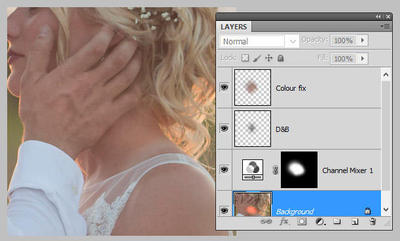
-
Help on how to remove a flare, please?
Damien Symonds replied to Laurie Solle's topic in Help with editing
Yes it is!!! I'm about to show you! I just didn't want to take the time if you didn't like it. Give me a minute ... -
Yep