Damien Symonds
-
Posts
213,131 -
Joined
-
Last visited
-
Days Won
3,543
Everything posted by Damien Symonds
-
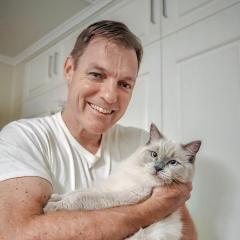
This tutorial was written about High Pass for sharpening purposes. You can adapt it for artistic purposes by using a much broader radius.
-
Current Monitor Recomendations?
Damien Symonds replied to kathleen08's topic in The Windows & PC Hardware Forum
As far as I know, yes. Not to say that BenQ aren't a good bet. I'm sure they're great. I've just never had a chance to try calibrating one. -
Current Monitor Recomendations?
Damien Symonds replied to kathleen08's topic in The Windows & PC Hardware Forum
I have no experience with BenQ, I'm afraid. -
It should be okay.
-
The newest update has been a pain for some people (me included). I'd only suggest updating to the latest if your computer is very new and powerful.
-
For a jpeg, just open it in Photoshop first, then go to Filter>Camera Raw
-
Can you explain why you want to open JPEGs in camera raw? Hell, why do you have JPEGs at all?
-
This is absolutely the problem.
-
This is completely correct. You must ALWAYS open a raw file into Camera Raw first. PLEASE don't wait any longer to take the Raw Class
-
You definitely don't want that. You need to have it set to the default "Automatically open JPEGs with Settings".
-
I can't remember if you told me, are all your programs completely up to date?
-
Okay, and when you double-click on that raw file, what happens? Just ... nothing?
-
Of course it's greyed out when you don't have a raw file selected. Are you saying that even when you have a raw file selected, THEN it's greyed out?
-
May I see a screenshot of this?
-
The watermark has to be partially over the most important part of the photo, if it's for security. However, in this day of AI that's pretty pointless, I'm afraid.
-
Well, neither of the photos you showed me are in any way prevented from image theft. That logo could be cropped or edited out in a second.
-
For what purpose are you adding a logo? Is it simply to advertise yourself, or is it also to prevent image theft?
-
Broadly speaking, the Asus ProArt is the higher-regarded of those two monitors. In my personal experience, I've always been very impressed with Acer monitors. For the budget, that one look good.
-
Select all the files in Bridge, then go to Tools>Photoshop>Image Processor
-
Do you want to watermark them as well?
-
How to change default setting?
Damien Symonds replied to Michelle Pena's topic in The Macintosh User Group
Ah ha. You'll have to find the equivalent settings in Finder. -
How to change default setting?
Damien Symonds replied to Michelle Pena's topic in The Macintosh User Group
So the association for .NEF is Photoshop? -
How to change default setting?
Damien Symonds replied to Michelle Pena's topic in The Macintosh User Group
https://ask.damiensymonds.net/topic/16951-br2-09/ -
Please help get a subject in focus.
Damien Symonds replied to MaddisPhotos's topic in Help with editing
I'm so sorry, there's nothing can be done to improve this.