


Damien Symonds
-
Posts
210,542 -
Joined
-
Last visited
-
Days Won
3,414
Everything posted by Damien Symonds
-

Colorchecker passport
Damien Symonds replied to Molly417's topic in Photoshop / Elements / Bridge / ACR questions or problems
Hi Molly, where did you save the profile, exactly? -
Yes, four or five would be good, if possible.
-
Yes, don't worry, that's very common. Lower that screen brightness, no matter how much you hate it.
-
I have to pop out to the post office. Back in ten or fifteen minutes.
-
Oh? What's strange about it? It's just a place to make the adjustments, which affect the whole screen. May I see a photo of your screen, and its OSD, to make sure we're talking about the same thing?
-
Bottom right is great. I love it when that's the case. One less thing to worry about.
-
The Spyder's own instructions are terrible. Please ignore them, ONLY follow my instructions.
-
Just to check, are these the instructions you're following?
-
How did you go, @BrianJoseph?
-
Canon RAW and Nikon RAW
Damien Symonds replied to Lloyd's topic in Miscellaneous questions or problems
What did you discover? You might find that you need to dabble with the camera calibration settings. -
@LaurieR?
-
Oh gosh, what a great question! I also get those emails from clients. The trouble is, laziness. No matter how easy and cheap the options are, they still involve some commitment and effort from the individual. There are some backup discussions here, but they involve photographers, not regular ol' members of the public.
-
Oh? Just go "Home", then scroll down a bit.
-
Always sRGB. But yes, 16-bit if you're doing heavy work. http://www.damiensymonds.net/2014/06/the-wide-gamut-myth.html
-
May I see a 100% crop?
-
I have to turn in, sorry, I'm beat. I'll sleep on this, and let you know if I think of anything else tomorrow.
-
Yeah, no, I'd say White LED should be the one. This must be some glitch with your graphics card, I fear. It's beyond my skill. You'd better contact X-Rite and see what they can suggest.
-
By the way, did you find this page? Is there anything there that might help?
-
Bugger. In the ColorMunki's preferences, under "Technology Type", what did you choose?
-
Yes indeed. Ok, next step. Can you go to Photoshop's Edit menu, and choose "Assign profile". From the Profile drop-down menu in that screen, choose the monitor profile you most recently created with your ColorMunki. Immediately you choose it (as long as the "Preview" checkbox is checked" you should see the image change somewhat. I need to know if the change makes the problem better, worse, about the same, or absolutely no change.
-
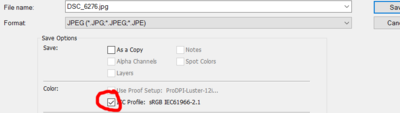
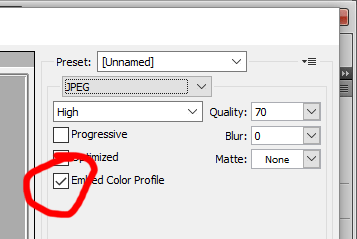
So many things to remember when you're installing everything on a new computer. Don't forget to turn on the document profile. Also, your image is untagged, that's bad. Always remember to turn on the profile checkbox: Enough housekeeping ... back to the topic at hand. Your screenshot looks flawless to me. What is the problem I should be seeing? If you zoom in to 100% view, then show me another screenshot, would I see it?
-
Ok, nothing jumps out at me there. Can you open a photo in Photoshop (any photo, it doesn't really matter) then show me a screenshot of your whole screen, so I can see the issue?
-
No, I mean a link to the manufacturer's website, so I can see ALL the specs.
-
Ok, may I have a link to the computer's specs?
