


Damien Symonds
-
Posts
213,131 -
Joined
-
Last visited
-
Days Won
3,543
Everything posted by Damien Symonds
-

Adobe bridge error
Damien Symonds replied to ishootfor3's topic in Photoshop / Elements / Bridge / ACR questions or problems
Oh gee, 4GB is only half of the minimum RAM that Adobe recommends for running CC. Definitely start by running this. -
Have you found another photo with a suitable bit of toe for swapping? In what way is this one different? May I see one of the other photos on which you did it successfully?
-
Liv - 4: Minimising Hard Shadow under nose
Damien Symonds replied to lsin's topic in Help with editing
I still think I see it, a tiny bit. -
I agree with Sam. And I'd say once you fix the colour, you might not even need much dodging.
-
This is the best I can offer. It's not perfect, but an improvement to a degree, at least. First, a fabric-coloured Solid Color layer on Lighten mode, and paint gently (10% brush) over the darkest areas. Then the Hue/Sat layer over the top.
-
Yeah, no, Channel Mixer won't work here, because the tones aren't different enough.
-
Pan tool not working
Damien Symonds replied to Krista's topic in Photoshop / Elements / Bridge / ACR questions or problems
You've restarted your computer, I trust? -
Was the banding evident before you calibrated, do you remember?
-
background replacement and banding
Damien Symonds replied to diamante67's topic in Help with editing
Ok, I don't think that's cause for concern. As long as it's not there at 100%, you'll be fine. -
background replacement and banding
Damien Symonds replied to diamante67's topic in Help with editing
What about at 50% and 25%? Banding or no banding? -
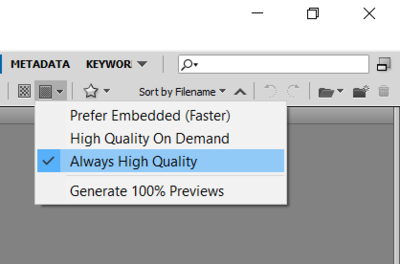
Check this:
-
Um ... are you going to show me the photo?
-
Oh, ouch. It might have to be this.
-
262GB is slightly less than the 1/3rd free space that Brian recommends, however it should be ok. Don't let it get any fuller, though. Ok, let's try this.
-
color space
Damien Symonds replied to HP78's topic in Photoshop / Elements / Bridge / ACR questions or problems
Oh, gosh, no, you must NEVER do that. Leave your Color Settings exactly as they are, on "North America General Purpose 2". That is the safe setting. http://www.damiensymonds.net/2010/02/please-ignore-your-monitor-profile.html Do you still have some of those older prints? To check that they still match your screen? As long as you can prove that, then yes, this sounds like a recent lab cock-up. -
Liv - 4: Minimising Hard Shadow under nose
Damien Symonds replied to lsin's topic in Help with editing
Just a little bright patch on the right-hand side. -
Alas, no, sorry. Sometimes depth-of-field blur can be passably sharpened for small prints; but this is motion blur, and it can't be fixed. Ditch the photo. http://www.damiensymonds.net/%3Fp%3D2573
-
Adobe bridge error
Damien Symonds replied to ishootfor3's topic in Photoshop / Elements / Bridge / ACR questions or problems
Can you do this for us? -
question about uniformity process
Damien Symonds replied to StacyG's topic in Monitor calibration questions or problems
Use Native. 7104 should be good enough. -
color cast on changing colour of blanket
Damien Symonds replied to Candi McGrail's topic in Help with editing
Great. -
Changing images to sgrb
Damien Symonds replied to HP78's topic in Miscellaneous questions or problems
Maybe, or maybe not. What file format are they saved in? -
Liv - 4: Minimising Hard Shadow under nose
Damien Symonds replied to lsin's topic in Help with editing
Yes. -
Yep, the Ultrasharps are excellent.
-
color cast on changing colour of blanket
Damien Symonds replied to Candi McGrail's topic in Help with editing
Download the PSD file It's going to seem like a heck of a weird process - first you make it black-and-white, then you make it skin-coloured, then finally you make it purple. But it's the only way I could find to prevent those casts, and problems with the edges.

