Damien Symonds
-
Posts
212,944 -
Joined
-
Last visited
-
Days Won
3,537
Everything posted by Damien Symonds
-
scrubby zoom
Damien Symonds replied to ChristalChildress's topic in Photoshop / Elements / Bridge / ACR questions or problems
Hey, cool, I didn't know you could tag either!!! @Crystal Felton @Lara Crystal, from my understanding, Scrubby Zoom is closely tied to your graphics processor. If it's suddenly stopped working, that would seem to suggest your graphics card needs a driver update, or something like that. -
Preserve & Archive Slides/Scanning
Damien Symonds replied to ConnieR's topic in Questions about tutorials and articles
Oh, I'm jealous!!!! I love my Epson V700. You'll love yours. -
Hi Cath, try this: A levels layer, with the following values for the sliders: RGB channel: 0/1.25/240 Red channel: 0/1.20/255 Blue channel: 0/0.95/255 Then mask to the hand.
-
Hi Jodi, can you recall what Quality Level you chose when saving this jpeg file?
-
Switching labs
Damien Symonds replied to JamieStefankoPhotography's topic in Monitor calibration questions or problems
Gee, warmer than Millers? That's really concerning. Millers are already too warm, compared to the international colour standards. Do Musea give any advice about calibration targets on their website? I have to admit I've never heard of Musea before. By the way, please don't use soft-proofing when comparing prints for the purpose of assessing calibration. -
keyboard shortcuts
Damien Symonds replied to Alex's topic in Photoshop / Elements / Bridge / ACR questions or problems
Hi Alex, can you fill this out for me? And can you tell me a bit more about the bad behaviour? Do you mean they don't work, or only sometimes? -
Well, if it happens again, let me know right away.
-
Hi Sarah, may I see your whole screen in the screenshot?
-
Clean Processing
Damien Symonds replied to Sue Morris's topic in Questions about tutorials and articles
Hi Sue, yes, a properly clean-processed photo needs both good raw processing, and good Photoshop editing. Is it as simple as ... ... maybe, maybe not. Every photo is different. Some need a little, some need a lot. I'm not sure what you meant by this: What "I want" is for your photos to be the best they can be. -
Was that it? I just realised that the relevant FAQ is actually in the "Photoshop help" section. I'm going to move your post there.
-
scrubby zoom
Damien Symonds replied to ChristalChildress's topic in Photoshop / Elements / Bridge / ACR questions or problems
Sorry, what do you mean by "working in car only"? -
Whenever somebody posts a question like this, I always hope that they have some kind of poorly-spec'd computer, so we can happily blame that. But in this case, your computer is plenty powerful, so this is most likely an El Capitan problem, sadly Are you noticing issues with Photoshop too?
-
Hi Sarah, you've chopped off the important bits of your screenshot, unfortunately. Usually this happens if your swatch (at the bottom of the toolbar) isn't exactly black. Press D then X to make sure it is. By the way, you have the dubious honour of being the first person to have asked a question which is already covered in the FAQs on this new forum
-
Can you fill this out for us?
-
I should have also added that you'll need to aggressively brighten the midtones of this photo, won't you, in order for it to look plausible on the white background. And heck, maybe desaturate it a little too.
-
I find the Shift key faster than the Pen Tool (although I am quite fast with the Pen Tool, because of my prepress background). Simply add a white Solid Color layer, invert its mask, then zoom in and paint around the outside of the bottle, utilising the Shift key as you go.
-
Some of the extra control you get can't actually be utilised on a laptop anyway. So it sounds like you might be ok with the mid-tier one?
-
Great! So the technical answer to your question is: The file should be 12000 x 9000 pixels.
-
Your first step is to find out what resolution the lab require/recommend. Most are 300ppi, but some differ.
-
Hi cooleybabe, you have the honour of the first ever post on the new forum! Yes, 4791x3194 is easily big enough to print at 40x30, or even larger, as long as the focus is good. But you must still upsize and sharpen. You can't just send that file to the lab and expect it to turn out great. You have to crop to the exact size and resolution required, then sharpen appropriately.
-
These are the site-wide rules that you need to agree to in order to join as a member. I have pinned them here in case you wish to revisit them at any time. Please take a moment to review these rules. Please remember that we are not responsible for any messages posted. We do not vouch for or warrant the accuracy, completeness or usefulness of any post, and are not responsible for the contents of any post. The messages express the views of the author of the message, not necessarily the views of this website. Any user who feels that a posted message is objectionable is encouraged to contact us immediately by using the "report post" link on the relevant post. We have the ability to remove objectionable messages and we will make every effort to do so, within a reasonable time frame, if we determine that removal is necessary. You agree, through your use of this service, that you will not use this website to post any material which is knowingly false and/or defamatory, inaccurate, abusive, vulgar, hateful, harassing, obscene, profane, sexually oriented, threatening, invasive of a person's privacy, or otherwise violative of any law. You agree not to post any promotional material or advertising for commercial purposes or personal financial gain. You agree not to advertise used goods or seek to purchase used goods from other Members. You agree not to post any copyrighted material unless the copyright is owned by you or by this website. You acknowledge that the forum moderators have the right to delete, edit, move or lock any post or thread that breaks any of these terms and rules, and generally manage the structure of the information on the Forums as they see fit. Our software uses cookies to distinguish you from other users of our website. This helps us to provide you with a personalized experience when you browse this site. There are additional guidelines in certain sections of this site that you are required to comply with.
- 28 replies
-
- 60
-

-
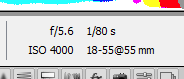
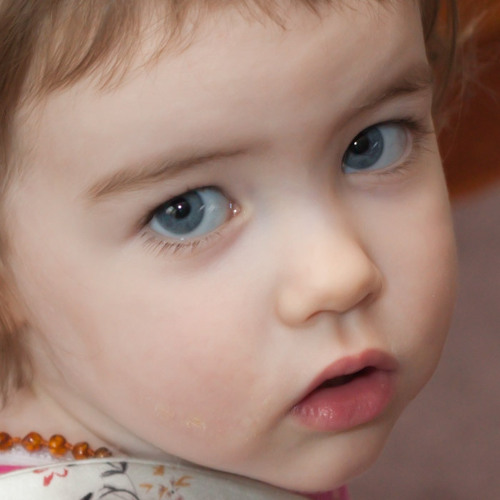
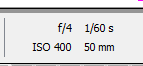
If you're fairly new to photography, it's easy to doubt and second-guess the focus of your images. "Is this photo sharp enough to keep?" is the first and most important question you must ask yourself when you get home from a shoot. If you're not sure, I can help. Please follow these guidelines before posting: The culling process is SO important, before you begin editing. You can watch an example culling process here. Make sure you've rejected all the obviously bad ones before doing anything else. Do your raw processing before posting. White balance, exposure, and so on. Most importantly, remove the noise! This is vital. Focus cannot be judged while noise is present. Don't just reduce some of the noise. ALL of it must go. When you post in this forum, I need three things: The whole photo (with the raw editing done, remember). A 700x700 pixel 100% crop. This must be done in Photoshop or Elements. If you don't do this part correctly, I will ignore your post. This is a low-priority forum for me, so the onus is on you. The details of the shot - the aperture, shutter speed, and ISO. You can type them if it suits you, or take a screenshot of them in your raw software, like this: I've provided an example post here. Once you've posted, when I have a minute, I'll take a look and tell you if the focus is good enough to go ahead and finish editing the photo, or if you should cull it. Some related reading: What you see when you pixel-peep If it doesn't rock, don't show it! Posting for critique on focus and noise A plea to all photographers How big can I print? How aggressively can I crop?
-
Focus check please.
-
Frequently asked questions about Bridge and ACR: Q. I'm new to Bridge. How can I learn about it? A. The great news is, it's very simple to learn, because it's very logical software. Just by cruising around in it for a few hours, you'll grasp it very quickly. To get you started, I have videos here and here which will help. Q. How can I batch process my raw files with Bridge? A. There are two main ways. The first is to open all the files in ACR at once, and do this. The second is to open just one file in ACR, edit it to your satisfaction, then press the "Done" button to close it; then right-click on it in Bridge and choose "Develop Settings>Copy Settings"; then select all the others and right-click again, and choose "Develop Settings>Paste Settings". Q. I opened a photo in ACR and it has red patches all over it! (Or blue patches) A. Those are clipping warnings. They are your friend. They show you where your detail is blown out. You turn them on and off by pressing the O or U keys on your keyboard (O for "overexposure" and U for "underexposure".) Q. What should my resolution be set to in ACR? A. It honestly doesn't matter. Most people set it to 300ppi because it seems to help them sleep at night, but in truth it's an irrelevant number. Resolution only matters when it comes time to print, later. More information about resolution.
-
Frequently asked questions about output: Q. Pretty much any question, ever, about selling digital files to clients. A. Here. Q. Pretty much any question, ever, about photos on websites. A. Here. Q. How big can I print my photo? A. As long as the focus and quality are great, as big as you like. As big as a house if you want. Read this article, and this one, and this one. Q. I saved my photos, then viewed them, and they look different! A. Not all programs are colour-managed. Windows Viewer will make your files look different from how they looked in Photoshop, and so will Google Chrome and Microsoft Internet Explorer. On your computer, browse your photos in a colour-managed program like Bridge. On the internet, use a colour-managed browser like Firefox. Furthermore, always make sure your files are in the correct colour space. Q. Can you recommend a print lab? A. We're gradually compiling a collection of lab reviews here. Hope it helps. Q. I'm uploading my photos to the lab for printing, and they look AWFUL on screen! A. Relax. It's just your lab's online ordering software (usually ROES), it does that to everyone. As long as your screen is calibrated and your files are in the correct colour space, you have nothing to worry about. Q. Why do my photos look bad on Facebook? A. Well, because it's Facebook. Read more here. Q. What's the procedure for sending my photos to the lab to be printed? A. First, flatten the layers of your master file. Then crop your photo as desired, to the exact size and resolution you'll be printing. Next, sharpen the photo appropriately. Finally, save as a Jpeg, then upload to your lab. Q. Why is part of my photo getting cut off when printing? A. It's the classic "8x10 problem", though it can happen with most print sizes. Read all about it here. Q. My client printed their images, and now they're complaining that they look bad. A. This can happen for a frightening number of reasons. First, they generally print them at cheap places like Snapfish or Walmart or wherever. Second, they often attempt to print the low res files you gave them to use on social media. Sometimes the files have been shrunk in the process of emailing them. Sometimes clients try to print them from their phones! Sometimes they've tried to add some kind of awful instagram-style filter and printed that. I don't want to say "I told you so", but ... I told you so. The first step in diagnosis is to ask the client to send you the file they had printed. If it looks different in size or colour to the file you sent to them, you know something has gone wrong at their end. If it looks the same as your file, then either you messed up the colour space (fix it and apologise profusely), or the lab messed up the print (encourage them to use a better lab). Q. I need to print a huge banner. How should I prepare the file? A. This is a question you'll need to ask the printer directly. They'll have specific requirements for colour, resolution, vector art, and so on. Q. I need to display my images on a projector at a meeting. What size should I make them? A. If possible, find out the resolution of the projector being used. If that's not possible, I think it's a good bet to go with the "HD" standard - 1920 pixels wide. Q. I'm printing business cards/flyers/or other marketing materials and my printer is asking for CMYK. What do I do? A. Read about CMYK here. Don't take any chances - post immediately if you need my help. Q. I have an iPhone picture that I want to print large. How big can I print? A. Modern phone pictures tend to have plenty of pixels, so your main concern is the focus and quality of the image, rather than its size. Examine the photo closely and critically. If the quality is good, print it as huge as you like. If you're not sure, post it for me to help you assess.
- 1 reply
-
- 1
-