Damien Symonds
-
Posts
213,139 -
Joined
-
Last visited
-
Days Won
3,543
Everything posted by Damien Symonds
-
Are you SURE this is the SOOR you want to work with?
-
Fine art portrait
Damien Symonds replied to airborne25p's topic in How to achieve a certain look or effect
Oh dear. Come on mate, this is awful. Really really awful. You've clearly forgotten everything. https://www.damiensymonds.net/trainingraw-signup.html -
Fine art portrait
Damien Symonds replied to airborne25p's topic in How to achieve a certain look or effect
No, the SOOR please. Raw work done, but no PS work yet. -
Fine art portrait
Damien Symonds replied to airborne25p's topic in How to achieve a certain look or effect
Well, may I have the SOOR of your photo? -
No, sorry, you messed up You'll need to start again, and do it properly
-
Oh dear, that doesn't sound good. May I see a screenshot of your layers panel?
-
Fine art portrait
Damien Symonds replied to airborne25p's topic in How to achieve a certain look or effect
Hi Sean, I don't know what you think "matte" is, but this is definitely NOT matte. It uses the full tonal range (the blacks are black) and if anything, the skin is shiny, not matted. All I see is a slightly over-warmed photo. Is that what you're referring to as well? -
Cropping tool
Damien Symonds replied to MIndyS's topic in Output - print, websites, Facebook, email, client disk, etc
Always checked, yes. https://www.damiensymonds.net/2011/09/cropping-tutorial.html -
Fabulous, well done.
-
How did you go?
-
Oh, yay! That's great news.
-
Don't delete it - just move it onto your desktop or somewhere. Then restart Photoshop and see what happens. If all hell breaks loose, put it back again.
-
No no, no beer! Just keep it and put it towards the class soon.
-
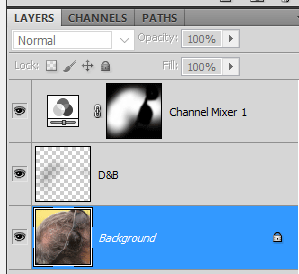
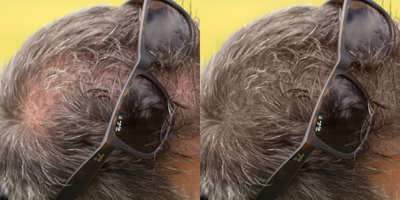
Ok, great! First, I added the Channel Mixer layer: Red 0, 0, +100, +8 Green 0, 0, +100, 0 Blue 0, 0, +100, -5 Masked on gently to the area. That'll do most of the work. But then I decided that some areas were still a bit too light, so I added a dodge and burn layer below the Channel Mixer layer, and burned a little. Please don't wait too long to take the Channel Mixer Class. It's so handy for all kinds of issues.
-
Do you think this might satisfy him?
-
Great! Did you read the whole article? You know what to look out for later in the workflow?
-
Then that's not the correct folder. Keep looking. Somewhere buried deep is the Actions folder which installs with Photoshop. It'll have half a dozen default actions in it, with names like "Text Effects.atn" and "Frames.atn".
-
What is the name of the one action in that folder?
-
As far as I can tell, your Photoshop Actions folder should be here: /Users/[user name]Library/Application Support/Adobe/Adobe Photoshop CC 2017/Presets/Actions Have you checked in that folder to make sure it really isn't there?
-
How weird! Which version of Photoshop do you have now?
-
No, it's moire: https://www.damiensymonds.net/2015/02/moire.html
-
Nothing from the skin class only, since it's not a standalone class. Some from the whole workflow, though: https://www.facebook.com/damien.photoshop/photos/a.183682458346830.39021.183680248347051/1434183749963355/?type=3&theater https://www.facebook.com/damien.photoshop/photos/a.183682458346830.39021.183680248347051/1169995546382178/?type=3&theater https://www.facebook.com/damien.photoshop/photos/a.183682458346830.39021.183680248347051/1173242026057530/?type=3&theater
- 1 reply
-
- 1
-

-
Oh, that looks about equal to me. I'm sure you agree that this focus isn't perfect. However, it's good enough to use, just. But it will need exactly the right sharpening. So for heaven's sake don't try to print it until you've taken the Sharpening Class.
-
It looks really good at this size.
-
Is there any part of her hands (or any other part of her body) that's more in-focus than her face? Or is everything about the same?