


Damien Symonds
-
Posts
213,139 -
Joined
-
Last visited
-
Days Won
3,543
Everything posted by Damien Symonds
-
I figure that the first and best approach would be to saturate the sky in raw, where the data is more robust.
-
Gee, that's a really good screen, I think. It definitely shouldn't band. Do you see banding in this photo?
-

Calibration tool
Damien Symonds replied to anthonyboy's topic in Monitor calibration questions or problems
No, it's too old. It won't be compatible with either your operating system or your monitor. -
Well, you'd need a wave photo to use, wouldn't you? I'm sorry, this is way beyond me. I'm throwing this open to everyone, to see who has expertise in this.
-
Can't you see "Convert profile to sRGB" under the "Save as Jpeg"? Bridge will change your life. Start here, then here.
-
Ok, to fix that patch of glare, use a Levels layer: Red channel 0/1.00/25 and 0/255 Green channel 35/1.00/255 and 0/245 Blue channel 45/1.00/255 and 0/240 After masking that layer as accurately as possible to the area, you'll probably need to add a new blank pixel layer above it, and gently clone to blend any troublesome edges.
-
No, not even close.
-
May I see a screenshot?
-
Ok, so hers isn't actually white, is it? You'll need to download her photo and get a reading of it.
-
I'll need to see it close up.
-
You'd make it white by doing this. However, after you've done so, you might find it doesn't look very good. A very white background makes the subject look dark in comparison. http://www.damiensymonds.net/2015/10/correcting-eyes-distorted-by-glasses.html
-
Yes, definitely. It's the best. http://www.damiensymonds.net/2012/01/web-browsers-and-facebook.html
-
How did you go, Amy?
-
Sharpening Security Camera Footage
Damien Symonds replied to Melissa Keeney's topic in Help with editing
No, sorry -
No, please, I beg you, don't throw money away that way. Let me teach you how much Elements rocks.
-
Oh yeah, sorry. That method didn't actually work anyway, even when the link did. Chrome is a bust, don't use it.
-
Hi Abigail, yes, I think I can help with this. Go ahead and do your raw processing as usual first, then post the photo again (no closeup needed) and we'll discuss.
-
Darn, sorry, you're right. I wasn't paying enough attention. Ok, may I see a screenshot of your layers panel for the above photos?
-
What screen do you have?
-
Yes, a whole class full. Please don't wait any longer.
-
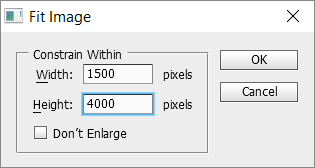
Yes, you sure can. Before setting up the action, resize one of your photos to 1500 pixels wide, then put your logo on it, and take the measurements, blah blah blah, exactly as I've instructed. The only peculiar thing you have to do is this: When you get to the Fit Image step, enter 1500 for the width and something outrageously big for the height: This will ensure that every photo is 1500 wide, regardless of shape or orientation.
-
How did it go?
-
Sorry This is just modern life. We all have to get used to smaller and smaller stuff on our screens.
-
Though I had it
Damien Symonds replied to Cynthia's topic in Monitor calibration questions or problems
The old prints, do you mean? Off how, exactly? How do they differ from your screen?
