Damien Symonds
-
Posts
212,719 -
Joined
-
Last visited
-
Days Won
3,521
Everything posted by Damien Symonds
-
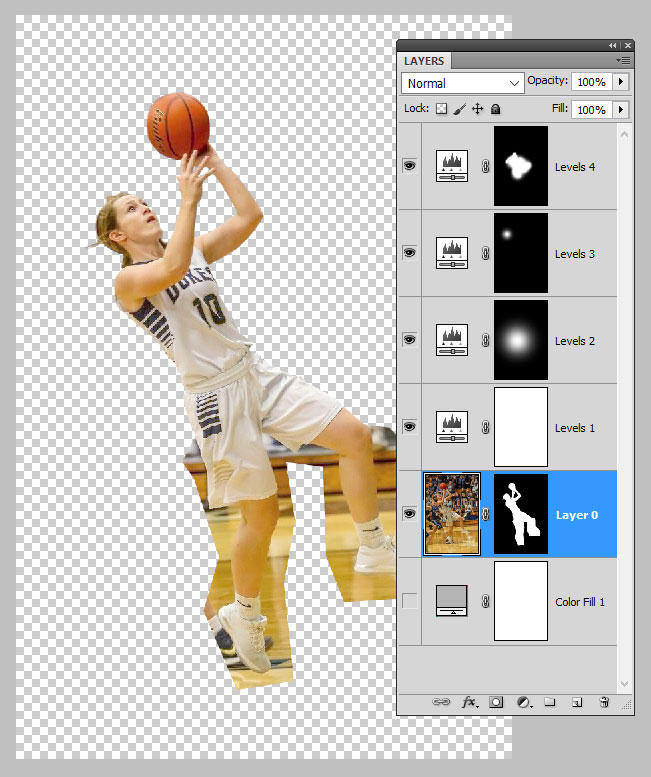
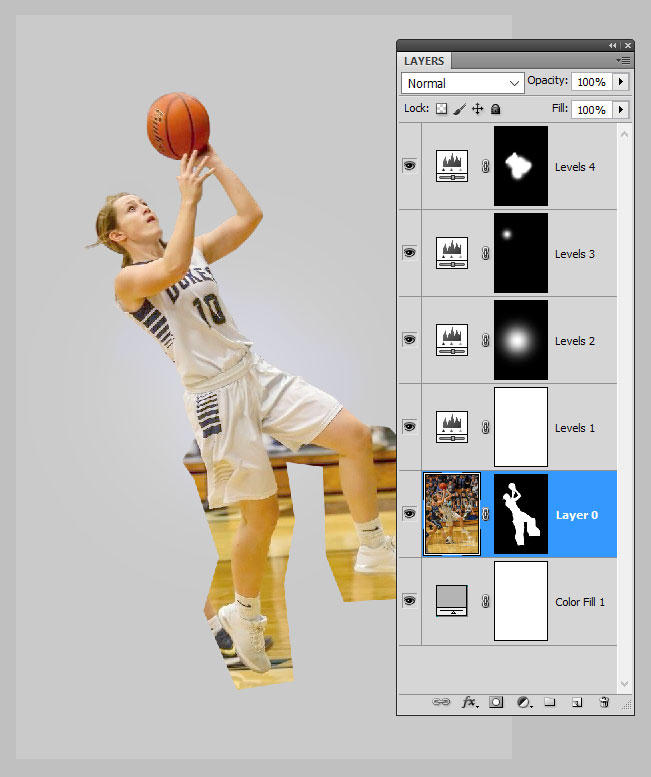
There is only one correct way to do the cutout, and it's vitally important. First, you double-click the Background layer to turn it into "Layer 0". Then you add a mask to that layer. Below that layer, insert a Solid Color layer of a similar colour to what will be there in InDesign. (It doesn't need to be the exact colour, as long as it's in the ballpark.) Above it, you can do your Levels work as required to make the photo look its best. Then mask very carefully around the subject: Once all the masking is done, turn off the Color layer to leave the transparent background only: Then save this as a PSD. It MUST be a PSD. Then close it. Then place that PSD file in InDesign. I can't stress this enough. This entire task is done with one PSD file. Never save as a jpeg, or a png, or anything else. On single PSD file for both the edit and the InDesign placement.
-
I'm so sorry, I can't see any pixelated areas as such. But I do have a number of grave concerns about this project. Firstly, if that is a true 100% crop, it means the photo is very small. What is the size of the page you're designing? Secondly, have you actually liaised with the printing company to find out exactly which CMYK colour space they require? You must never automatically assume that they want Web Coated (SWOP), because if you get it wrong, the consequences can be dire. Thirdly, how did you actually perform the cut-out? What method did you use?
-
Also, @abfriesen, could you tell me a bit more about the history of this photo? Was it provided to you already like this? I mean, in CMYK mode, and badly cut out?
-
Hi Abbie, could you take some 100% crops to show me the pixelated areas up close?
-
I hope you will consider The Bridge Class. It's only ten bucks, and it will rock your workflow, I promise.
-
For 90% of photos, 8-bit is fine and 16-bit is complete overkill. You only need 16-bit for photos that require major Photoshop editing. For skilled photographers who get their light mostly right in the shot, 8-bit is all they need. It can depend on your subject matter, though. What kind of photos do you take? Sure! Again, just open one raw photo, completely unedited, and change to the profile you like. Then from the little submenu (on the right-hand side near the white balance and exposure sliders) choose 'Save new camera raw default'.
-
As long as you only have one photo open at the time, and as long as you subsequently open the photo into Photoshop, the sRGB should stick as the default once you change it. (Until Adobe pushes through the next software update, which always seems to reset it, annoyingly.)
-
For the photos you edit with Bridge, you simply click on the link at the bottom of the ACR window. Below the photo. See it down there?
-
Hi @Deuter, thanks for your question. Colour space is dictated ENTIRELY by the raw program. Photoshop's Color Settings are wholly irrelevant. I know it seems strange, but that's how it is. You need to set Lightroom to sRGB, or if you actually care about the quality of your portfolio, abandon Lightroom and make the switch to Bridge.
-

HELP REQUIRED
Damien Symonds replied to Miriam H's topic in Monitor calibration questions or problems
@Miriam H, you have to log in before you can post a question, remember? -
Once you do it once, it should stick. But of course always remember to glance and check.
-
Have you finished the raw class yet, @SWhit?
-
The moire in this one is mild enough that you should be able to get away with the Solid Color layer on "Color" mode.
-
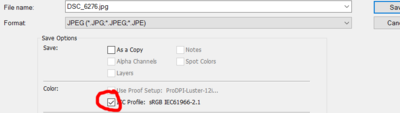
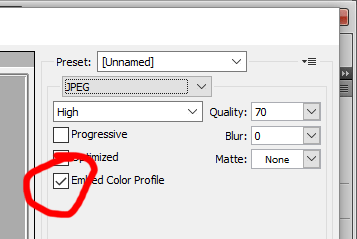
Not relevant, but VERY important: your files are untagged. Make sure you always include the profile when saving.
-
Pure white background for product shots
Damien Symonds replied to Laura T's topic in Help with editing
One thing I realise I haven't asked - how do you feel about the natural shadows that appear below some of these fabrics? Stay or go? -
Pure white background for product shots
Damien Symonds replied to Laura T's topic in Help with editing
Yeah, it's a REALLY tricky one, all right. I guess you'll have to leave the raw edit a bit darker; but then you're condemning yourself to VERY painstaking masking of the white Solid Color layer around those threads. -
Well yes, I realise it isn't very comforting But I figure it's important for you to be fore-warned. Make sure you post back if I can help further.
-
Well yes, I guessed that was the case, but I warn you that it doesn't mean you're entirely out of the woods. Have you read this article? https://www.damiensymonds.net/2015/02/moire.html
-
Pure white background for product shots
Damien Symonds replied to Laura T's topic in Help with editing
Gosh. Was it any more visible than this SOOC? I wonder if it might be necessary to change the raw processing a little? -
Are you still there, @Chantal?
-
Pure white background for product shots
Damien Symonds replied to Laura T's topic in Help with editing
Holy moley. That's a different matter. May I see a closeup of those threads? -
Help with website tutorial
Damien Symonds replied to lacogada's topic in Questions about tutorials and articles
Um ... ok. -
Well, we need to clarify the difference between the file itself, and how you're viewing it. I have no doubt that your 16-bit file is as perfect and smooth as you'd expect it should be. But no matter whether your file is 16-bit, 20-bit, 100-bit, or even a thousand-bit, you're still only viewing it on your screen. And your screen, unless you've spent big money on one of those 10-bit jobs, is 8-bit at most. (Some older screens were even lower!). I don't profess any great technical expertise in this matter. But my guess is that you're right, in a roundabout way, about the dither on the 8-bit file. The dither is helping your screen, as much as the file itself. Does this seem plausible?
-
Pure white background for product shots
Damien Symonds replied to Laura T's topic in Help with editing
Yes, you'd better do that. It might, but let's not re-invent the wheel. You've already done that photo, so post another one for me. -
It's funny, I've actually been having this exact same conversation in another thread, but it's in the Premium Area, which is why you didn't find it in your search. You are absolutely right to be skeptical about this bracketing business. It's rarely necessary. Generally, you'd just use the middle-weight one (the left-hand one in your set of three above). PLEASE post them in class when you start to edit them.