
Damien Symonds
-
Posts
213,265 -
Joined
-
Last visited
-
Days Won
3,546
Everything posted by Damien Symonds
-

RGB levels dropdown greyed out
Damien Symonds replied to Kim Howells's topic in Miscellaneous questions or problems
Yeah, it's just one of those glitches. Happens to everyone from time to time. -
Srgb
Damien Symonds replied to AngieMcHenry's topic in Output - print, websites, Facebook, email, client disk, etc
https://www.damiensymonds.net/art_tscs2.html -
Srgb
Damien Symonds replied to AngieMcHenry's topic in Output - print, websites, Facebook, email, client disk, etc
PLEASE don't wait any longer to check out the bonus module of the Sharpening Class. It doesn't cost you any extra, and it's really important stuff. And I hope you'll consider the Channel Mixer class, it's great fun. -
Photoshop CS6 Hard Copy
Damien Symonds replied to candyK's topic in Miscellaneous questions or problems
If people ever ask me: "I already own Photoshop CS5/CS6, should I upgrade to CC?" I always shout "NO!!!!!!!!!!!!!" I tell them that they shouldn't start paying a monthly fee for something they already own outright. But in your case, no, I wouldn't take a step backwards.- 1 reply
-
- 1
-

-
Srgb
Damien Symonds replied to AngieMcHenry's topic in Output - print, websites, Facebook, email, client disk, etc
https://www.damiensymonds.net/art_tscs000.html -
Oh yes. Midtone contrast first, then yes, Hue/Sat.
-
Colour issues
Damien Symonds replied to StasiaB's topic in Monitor calibration questions or problems
No no no no no! You don't need new prints!!!!!! Any old prints will do. -
Colour issues
Damien Symonds replied to StasiaB's topic in Monitor calibration questions or problems
No, Windows and PS will never match each other. PS is colour-managed, Windows is not. The only thing that matters is getting the calibration right so that PS matches your prints. Tell me about that. -
Colour issues
Damien Symonds replied to StasiaB's topic in Monitor calibration questions or problems
Oh! Well, there you go. No, it doesn't carry over, you must calibrate the Samsung. And understand that once you do that, the laptop screen will be useless for editing on. I know there are quite a few people who use HN very happily. I'd say it will be good enough for this purpose, for now at least. Remember that you don't need to order new prints - any prints that you already have lying around are fine. -
Colour issues
Damien Symonds replied to StasiaB's topic in Monitor calibration questions or problems
I have to pop out and pick up my kids from a play date. I'll be gone a little while. I wanted to check - did you follow my calibration instructions here? Also, can you tell me which lab you have your prints from? -
Colour issues
Damien Symonds replied to StasiaB's topic in Monitor calibration questions or problems
Terrific. And you'd be aware, I suppose, that the Spyder Express doesn't let you calibrate two screens, so you've only calibrated the Samsung screen is that correct? -
Colour issues
Damien Symonds replied to StasiaB's topic in Monitor calibration questions or problems
Now, this is VITALLY important. Have you made sure that, in the Displays control panel, you've got the screens set to "Extend" not "Duplicate"? Duplicate is very very bad.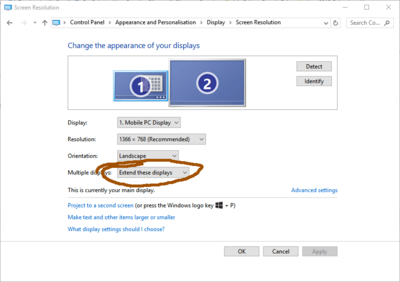
-
Colour issues
Damien Symonds replied to StasiaB's topic in Monitor calibration questions or problems
Oh, bummer. Samsung screens are notoriously bad. Anyway, let's see what we can do. -
Colour issues
Damien Symonds replied to StasiaB's topic in Monitor calibration questions or problems
Hi Stasia, let's start with a bit more info. Your profile says you have a laptop, but the HD monitor you're talking about - is it an extra monitor that you run off your laptop? Also, which Spyder do you have? -
That's great news. By taking the Raw Class. Please don't wait any longer.
-
Ok, and how's the print comparison?
-
Ok, this is really important. As soon as you've finished calibrating, I want to discuss this more. May I see screenshots from the two interfaces?
-
Oh, I remembered another important question. Do your raw photos look exactly the same between ACR and Photoshop?
-
Yes, in Photoshop, that's right.
-
What?????? Haven't you read the "troubleshooting" part at the bottom of the instructions??????
-
Which web browser do you use?
-
Can you post them here? The files you sent to the lab, I mean.
-
Now I'm confused. Are you, or are you not, getting reprints?
-
Hang on, aren't you getting reprints?
-
You don't set up Photoshop to be less saturated. We have to get it representing the prints exactly, so that you don't EDIT them too saturated.