
Brian
-
Posts
4,149 -
Joined
-
Last visited
-
Days Won
57
Everything posted by Brian
-
The cool part about G-Drives is besides being Mac OS Formatted, they include Thunderbolt Cables, so you will have everything you need.
-
Personally, I'd get a 1TB SSD Hard Drive if you can. Single Configuration. We could always add a 2nd HD to your computer at a later time. It's pretty easy to install.
-
Here, buy this Crucial 32GB upgrade kit from B&H and be happy. You will end up having 40GB of RAM, which is what I did (and have on my iMac). Externals, I have this G-Drive 12TB Thunderbolt 3 HD. Virtually no lag or bottlenecks, and it's feels like a HD that is installed internally into the computer. G-Drives come Mac Formatted so it's really plug-and-play. Yes, I'm very good at spending other people's money and have expensive tastes. I personally do not cheap out on my hard drives.
-

confirmation on resolving power, for real or cheating?
Brian replied to rahullele's topic in Photo Gear & Equipment
No. If you are shooting RAW, it's probably a bit-depth setting somewhere. 14-Bit Compressed, vs Un-Compressed or even Lossless will produce different results. I'd check the settings before jumping to conclusions. As for the file size difference with the 70-200, I'm not sure about that one. It might be due to the extra info contained within the Raw file when you have a VR Mode turned on but this is a complete guess on my part. I almost never use compression on my stuff, in fact my normal Raw mode is 12-bit Uncompressed. So I would set your D750 to 12-bit uncompressed and take a few test shots. If the file-size stays consistent, then it's the compression algorithms that are changing things. -
It's fine. Buy it. It's not just you, it probably is different. These manufactures will configure units with the parts that are currently in inventory and that changes from week-to-week or month-to-month. There isn't any real difference as far as you are concerned. Enjoy your purchase.
-
The main issue with places like Best Buy, B&H, etc. is that they just have the "Stock" models available, which doesn't give you any huge choices. Meaning, you have to configure / purchase the iMac from Apple to get one with the most performance. I just checked Best Buy's website. You can choose a stock iMac and pick your HD Capacity but it's just a Fusion Drive and not a SSD Drive. What's a Fusion Drive? It's a Traditional Spinning HD with some memory chips from a SSD, usually 32GB or less. Basically, the OS moves files to the SSD chips on the drive for a performance boost, usually boot-times, but the other 99.9999% of your data will reside on the slower traditional HD side. So for the best performance, opt for the true SSD choice. Do not get a 500GB HD trying to save money. A SSD Drive won't do you a damn bit of good if its full, regardless how fast it is. There are several posts & members here who have found this out the hard way. I'd rather you spend the money on a SSD drive at the time of purchase and get extra RAM later than to cheap-out on the HD.
-
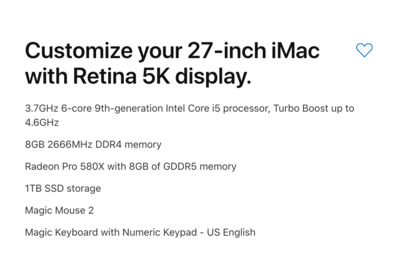
The new 2019 iMac line that has just been released is A LOT faster than the 2018 models. Even though the specs / speeds look to be similar, there are other factors that are under-the-hood, such as more processor cores, faster video graphic processors, and better / faster Chipsets that control data-flow on the motherboard. (CPU to RAM to HD, etc.) Since you are primarily doing accounting, you don't need a huge-and-expensive iMac. Whatever you do, skip the 21.5" iMac and stick with the 27" model. The tough part is balancing the options on your iMac and your budget. The biggest speed performance boost that you can do when configuring your iMac, is to choose a SSD Hard Drive. Not a Fusion Drive, but a full SSD Drive. Unfortunately, if I select the base $1799 iMac and configure it with a SSD Drive, that adds $700 to the cost. ($2499.) In my humble opinion, Apple really wants you to "Go Big or Go Home." I configured all three options on Apple's Website. All I did was replace a Fusion HD with a 1TB SSD Drive. The prices ended up being $2499, $2699 and $2799. Here's the kicker, out of all three, the $2799 model was "The Best Bang for your Buck." Why? It had a better / faster CPU chip, and a better graphics card with more video memory...for just $100 more than the $2699 model! I then added the new Apple Bluetooth Keyboard with Numeric Keypad Built in for an extra $30, bringing the total to $2829. Now, one thing I didn't do is upgrade the RAM at the time of purchase. The reason is Apple's RAM is extremely over-priced for what it is. The RAM I think Apple uses a lot is from Micron, which is the parent company of Crucial.com, if my memory serves me well. So I'd configure the $2299 27" iMac, upgrade to a 1TB SSD Drive and add the numeric keyboard for an extra $30. Then head to Crucial.com and purchase a 16GB Kit to get you to 24GB. That said, if you did upgrade the RAM to 16GB, and then added a 16GB from Crucial, you would have 32GB of RAM. But for financial programs, I'm not thinking you will benefit from 32GB of RAM. The SSD HD makes a HUGE difference. In fact, my iMac from a powered off state until the sign-on screen takes about 15 seconds, since I have a 1TB SSD. Installing programs is a breeze AND the OS Update that I installed yesterday was very quick. On my 2009 iMac, the update took about 20-25 Minutes to complete, on my 2018 iMac, it was about 3-5 minutes? Somewhere around there? It completed without me paying any real attention. Side note: In case you are wondering, you can not use the RAM from your 2014 iMac in the new 2019. Even though they look the same and install the same, the chips on the RAM sticks are different. The 2019 iMac needs faster RAM Chips than what was required on the 2014 models.
-
Purchase the computer. Get it setup and start using it. Head to Crucial.com and download their scanning tool on the new computer. Run the Scanner. After the scanning tool does its thing, it will take you to a page with your options Post a screen shot here with said options and I will let you know which kit to purchase. You will install the RAM yourself and I can assist you with this process. There are also several YouTube videos that demonstrate what you do. It's not that hard. I will also have a few tidbits and precautions for you to do before the install, so check back with me before you open the case. Installing RAM in a Desktop is easy.
-
When you uncheck the box to use the graphics card is the only work-around at this point. The issue is PS isn’t playing nice with your video card drivers. So either a future PS update OR video driver update will address these issues. For now, you are kinda stuck. Downside to not using the Graphics Processor? Speed. Some features are faster with the box checked...but it’s not a deal breaker. Bottom Line: Uncheck the box for now.
-
Yes. It’s very easy to add more RAM at a later date. You can order it online and install it yourself. The XPS Desktop Line is pretty easy to work on. Right now just get the computer and we will go from there.
-
Yes. You will install RAM in your computer at a later date. We will get it from Crucial.com. If you don’t want to go this route, and have Dell do it, upgrade the RAM to 32GB for $150 more.
-
Forget the Optaine RAM. You can get standard RAM from Crucial.com. I wasn’t aware that you needed a spinning HD. All of the other choices are fine. As for the sale, write all these selections down so you can configure a future system with similar specs. Things don’t change THAT much and when you upgrade things, it’s for more speed and performance, so it’s not like you are losing out. Dell runs sales all the time. Wait a few weeks. Heck, there might be one next week for all we know.
-
Yep. Upgrade to .67 and turn on use graphics processor and see if that fixes it. If not, uncheck the box in PS again and restart PS.
-
What Video Card Driver Version are you using? Here is the latest driver: https://www.nvidia.com/Download/driverResults.aspx/145178/en-us
-
The regulars come to mind... ShootProof, SmugMug, etc. Since you are looking for inexpensive, I'm thinking of you trying Pixieset. The have a "Free" plan, though the downside is you only get to post 3GB / 1000 photos and there is a 15% commission fee. I know you stated that people "aren't buying just looking" but that's not how these proofing sites work. If you want a free proofing gallery, you are going to have to purchase a website template (usually Wordpress based) that has a proofing gallery module included. I think I'm going to move this thread to the Land of Misfit Toys for others to chime in.
- 1 reply
-
- 1
-

-
Yeah, that’s one of the things that go wrong with the ColorMunki. Especially if you live in a warmer climate. With the Mac, you have limited controls so you don’t need anything fancy. A Spyder5Pro is fine so is a ColorMunki. Just be sure to download the latest versions of the calibration software from the manufacturer’s website.
-
Sweet!! I love discounts!!! Maybe get the iMac with 16GB, and that leaves you two free slots (out of a total of four) to put in two 16GB Sticks for a Total of 48GB! I think this kit will work but you might want to contact Crucial.com directly and see if it's compatible with a 2019 iMac. Remember, they just released this new model with a new RAM spec. The new 27" iMacs use DDR4-2666MHz RAM sticks. Oh, and I just saw the latest benchmarks for the iMac you are about to purchase. Man, I wish I would have waited 8 Months. Talk about a performance boost. You will be quite happy for a long time!! One more thing, the new iMac screens use a different style LED, and I think you are using the ColorMunki? If so I have updated instructions that don't seem to be on the website so let me know. Have your test prints handy because things have changed a lot in 8 years. One think that is good is that Adobe finally figured out how to deal with a 5000K Retina Screen, so things don't look tiny, in fact these new iMac Screens look like the 27" models from your era of iMac, only there is A LOT more detail when you zoom in. Keep me posted. I want to help you see this through until the end. Upgrading the RAM yourself is VERY EASY to do, it's just a simple access panel in the back. So when you are ready to install the extra sticks, let me know. Plenty of YouTube videos demonstrating the process, plus my own experience that aren't covered in the videos.
-
You are in the same position that I was last year. I kept running out of RAM. Surely 16GB should be enough, right? Wrong. It seems that with each update, the current Mac version of Adobe CC wants more and more resources. Combine that with High Sierra taking a CHUNK for itself, which I think is intentional to get you to buy a new Mac, makes for a recipe of headaches. Currently, my new Smokin' Fast iMac has 40GB of RAM. I bought it with 8GB and added a 32GB kit from Crucial.com. Without anything running, just High Sierra and the Adobe CC / Calibration Apps, Microsoft One-Drive, etc. running in the background, I'm down to 29GB-ish...well at least that what CleanMyMac X states, and before I open ANY images in PS. That's 11GB for just the OS and a few background Apps. >> You are in the same situation but only have 16GB to start with. 16GB minus 11GB leaves you with 5GB to play with. << That's why you are having your issues. You are out of RAM and can't go any higher. As soon as you open a couple of images, boom...you have used up your remaining 5GB. Then Photoshop / Bridge / LR starts relying more and more on the Hard Drive to supplement RAM with cache files, and Hard Drives are a lot slower than RAM, which then results in the "slowness" you are experiencing. You have a 2011 iMac that is 8 years old. That's about the time-frame that they get replaced. I'm sorry to say this but a new computer is in your future. Regardless what anyone's opinion is; I would also tell them the same thing if this was a Windows Computer with the same problem. It's not hardware related, it's the stupid software being more complicated today than ever before. The funny thing is, I can see this happening on the Windows side as well. 16GB is the MINIMUM you'd want with either a Mac or Windows computer when running Adobe's current CC software. Those that are running CS5 or CS6, they won't have this issue until they upgrade, then they will be in the same situation as you when they do. I have a feeling you are the first of many that is going to post a "My 2009 - 2012 Computer is running so slow. It's complaining about lack of memory...." type of question. Unfortunately, the answer to how to fix your problem is to replace your computer with one that can go higher than 32GB of RAM. In my humble opinion, you really want 32GB of RAM if you are editing photos on a Mac...well at least upgrade to 24GB if necessary. The current iMacs that were just released, well the one I configured for you, officially goes up to 64GB but OWC tested and confirmed it can go as high as 128GB, which makes sense with the current chipset and CPU. Even if you purchased a new $3800 Smokin' Fast iMac, 16GB (what we configured and is in your shopping cart) just is not enough. You will also need to budget for extra RAM on top of that $3800. The tough part for those who are reading this thread and have a current Mac Laptop that is maxed out at 16GB are also likely in the same situation with the same recommendation from me: New Laptop. SMDH. Money-Money-Money. So think long and hard about your budget. Don't let a fancy-guy like me talk you into blowing over $4000 on a iMac. That is a chunk of cash to spend all at once. The funny part is, you'd still be spending around $2500 for a similar Windows Gaming System and have to deal with data-conversion. Chances are you are like me and would stay on a Mac. You do not need to upgrade all the components to run Photoshop well. Honestly the $1999 iMac configuration is a good buy. Sure it doesn't have the beefy CPU and fast SSD drive, but it is a more digestible amount of money to spend. Of course, my iMac is Smokin' Fast and a joy to use. It should be for the amount I paid for it. LOL!!!
-
How about increasing the Cache Size form 100000 to 300000? You should have the room on your main HD. Of course after making these changes, you'll need to exit and restart. Right now you only have 100MB-ish reserved for Bridge's Cache. If you have a fancy high MP camera, like a Nikon D850, you might have to increase some settings. Once you get over 24MP, Raw files get harder to work with on older computers.
-
I myself was in your situation last July. My 2009 iMac just couldn't keep up. I saved up and bought a really expensive new iMac, which is Smokin' fast. I don't plan on replacing this one for another 8 years or so. I almost got 9 years out of my old iMac and couldn't be happier with the new one. So I guess what I'm saying is "Buy it Right-Buy it Once." More than once have I been bitten by the "It's almost as good as..." bug or it's cousin, "I can only afford..." In the end I have Buyer's Remorse and end up getting what I should have purchased in the first place. So if you can save up for a few more months and stick with your current but annoying computer, I'd do that. Get the Smokin' Fast Machine, even if you save up for it and buy it a few months from now. That's what I did.
-
Wow. You are running out of RAM and even Swap Space, which is an area used on the HD that's treated as RAM. (Scratch Disk, et. al.) Unfortunately, your iMac is 8 years old and is maxed out on RAM @ 16GB. What camera are you shooting with? How big are your Raw Files SOOC? Are you running Photoshop CC? Have you tried running an older version and not the "Latest and Greatest?" I'm wondering if the latest round of Adobe updates are requiring more horsepower from your computer, which unfortunately isn't there. Besides LR and PS/Bridge, is there anything else running? I'm probably sure Safari is with multiple Tabs running. You might want to close down any browsers while working with Adobe's programs. At this point, a new computer for you isn't off the table as an option. Of course this is like curing the patient via killing them, but 8 years is 8 years and the average time-frame that a computer lasts. So before clicking buy, we should eliminate all possibilities first.
-
LOL!! Damien is crying out for you over on FB. I think his soul dies a little when people purchase a Mac. Of course, my configuration is very expensive and it's the formula that I used when I bought my iMac this past July. Plus, it's tough to go from the Apple File System back to a Windows System. Apple makes it very easy going from a Windows Computer to a Mac; going from a Mac to Windows can have all sorts of surprises. He likes the Meme of "Bought a Computer and a Lens" instead of buying a Mac. From my perspective, I keep hitting that $2000 mark with my Windows PC builds. Heck, I was up to $3000 on one configuration. When you purchase high-quality parts, the cost goes up. Period. Whether that's a Windows computer or a Mac. How different is it spending $1700 on a iMac or $1650 on a Windows 10 machine? It's all the same. Granted, spending $3800 on a iMac is a bit extreme, and at the end of the day, it's your money. Honestly, I'd rather you spend the $40 on CleanMyMac X and have a go with your current computer.
-
At the very least, get the 1 year subscription. You can use it now for your current Mac and transfer it over to the new Mac. I highly recommend the program. It just works. I use it weekly at the very least and even every few days. It's a one-button click to scan and then another click to clean stuff. Plus the "Run Maintenance Scripts" is what you need to do to scan your current computer. For $35, it's worth it for a year. If they do come out with CleanMyMac XI at some point and you decide to purchase the one-time fee version, you can do it then.
-
Hmm...that's a tough call. I do know that they often upgrade CMM on a regular basis. That said, the one-time fee only applies to that version. So for example, let's say you purchase a one-time thing for CleanMyMac 10. I don't think you will get CleanMyMac 11 for free but it will be available to you at a discount. I think around $20-$25 or so. I can't remember which version I did, I think the one-time purchase. With that version, even if I never upgraded to a newer major release, I could use it forever. For example, say you purchased CleanMyMac 3 for your 2011 iMac in 2014 with a one-time purchase. It will continue working without them bugging you to buy a new license in 2020. So I'd purchase the one-time fee and be done with it.
-
Your configuration is perfect. Be sure to have a couple of Apple Reps escort you to your car. Walking out with $3800 of equipment is a bit risky. We can add extra RAM, to take it to 32GB some time in the future. 16GB is fine for now.