Damien Symonds
-
Posts
213,139 -
Joined
-
Last visited
-
Days Won
3,543
Everything posted by Damien Symonds
-
 Is it accurate?
 -
In sRGB of course.
-
I can't tell from here. You'll need to open the photo into Photoshop, and check with a Levels layer.
-
Yep, this looks all as it should. Ie completely fucked up. https://www.damiensymonds.net/bridge-30-day-challenge
-
No, just with soft-proofing on and off for now.
-
Ok, could you show us two screenshots (off and on)?
-
Printing a Flyer
Damien Symonds replied to Samantha_R's topic in Output - print, websites, Facebook, email, client disk, etc
Have you left enough space to hand-write the date on the "expires" line? -
Have you actually set it up? To sRGB?
-
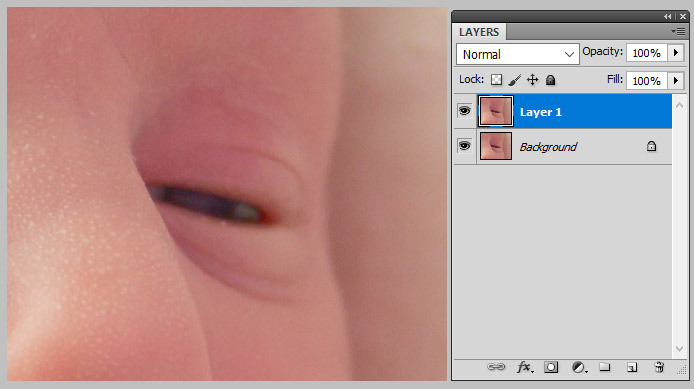
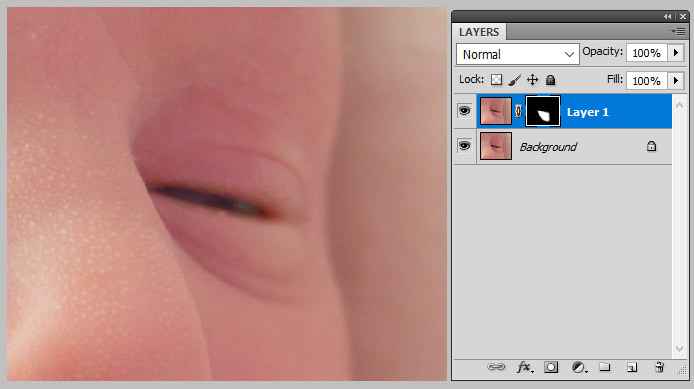
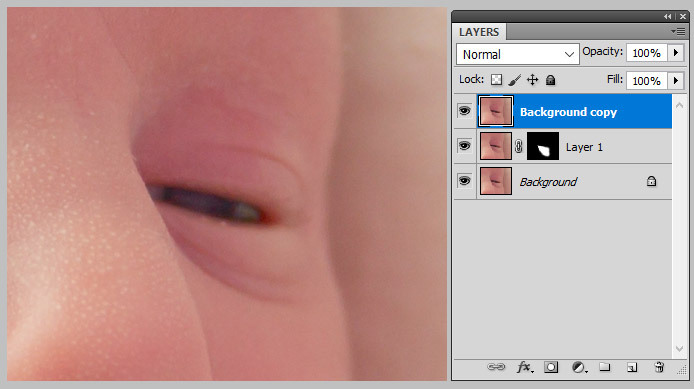
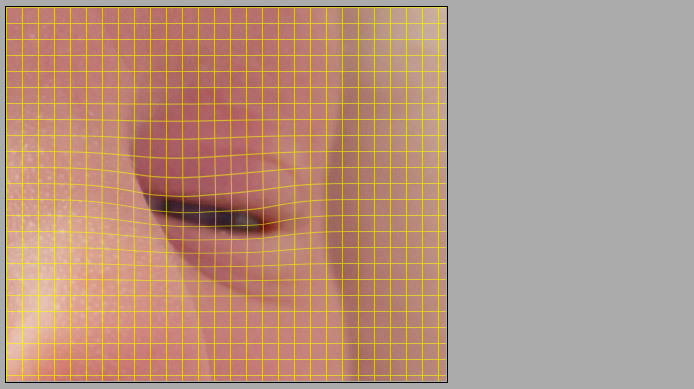
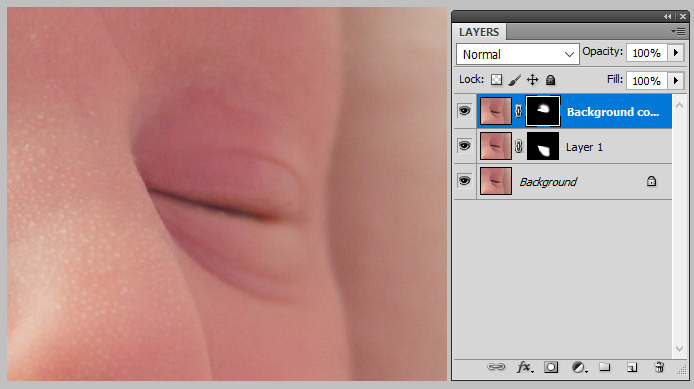
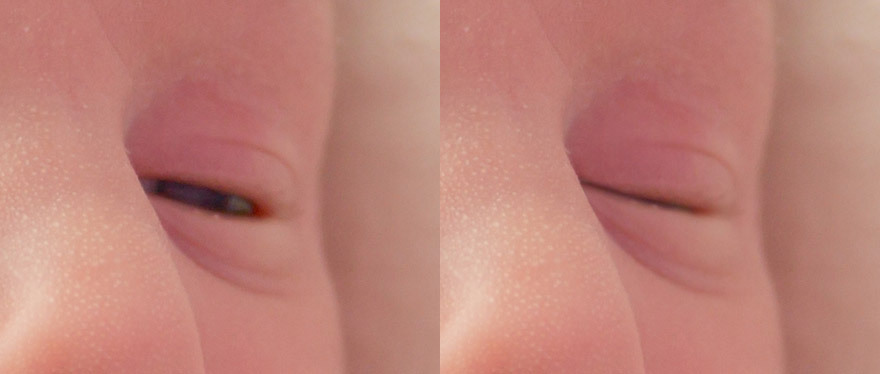
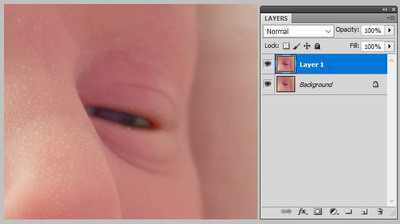
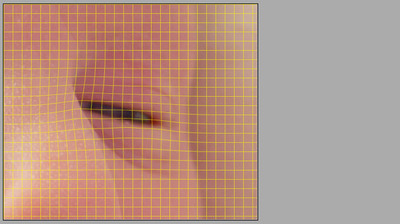
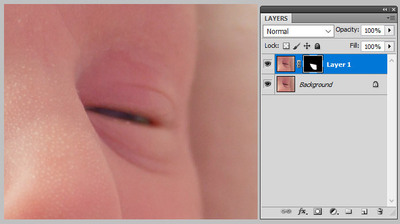
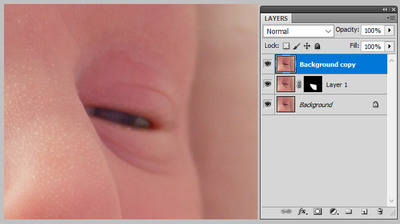
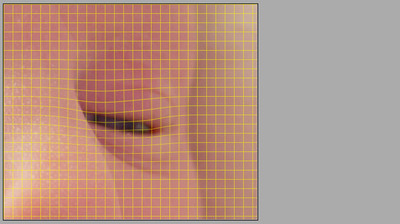
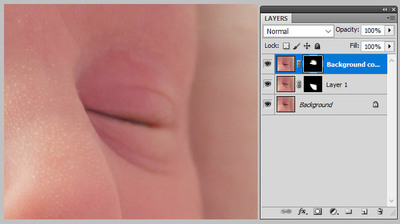
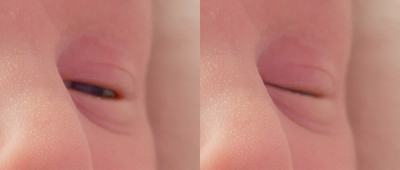
This method involves liquifying the lids up and down respectively to meet each other. First, duplicate the Background layer: Then go into Liquify and push the bottom lid up about halfway. Of course this will push the top lid etc up as well, but that doesn't matter. Make sure you use a fairly big liquify brush - at least as big as the whole eyeball: Once you press OK to return to Photoshop, add a mask to the layer and carefully mask it to just the lower lid and the eye bag area below it: Then return to the Background layer and duplicate it again, and drag it to the top: Liquify again, and push the top lid down a bit. Yes, it will move the whole eye as well, but that doesn't matter. Remember, use a fairly big brush: Return to the layer, and mask it: End result: That process was quite quick to describe, and in fact it was fairly quick for me to do, since I've had a bit of experience at it. But allow enough time, and be prepared to have your patience tested. You might need to start over a few times, until you get the liquifying just right.
-
Printing a Flyer
Damien Symonds replied to Samantha_R's topic in Output - print, websites, Facebook, email, client disk, etc
The leading (line spacing) is still too small, I think. -
Printing a Flyer
Damien Symonds replied to Samantha_R's topic in Output - print, websites, Facebook, email, client disk, etc
Show me how you go. Once the text is nice, we'll talk about the final step towards that PDF. -
I think, with a bit of Liquify to tuck it in, followed by some D&B, it could be reduced to an acceptable degree. It would probably be necessary to slightly blur away the veil detail, though, because it would be stretched outta shape during the liquifying. And yes, I laughed at your joke
-
Printing a Flyer
Damien Symonds replied to Samantha_R's topic in Output - print, websites, Facebook, email, client disk, etc
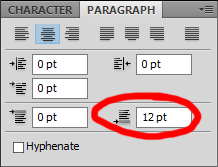
Yes, it's quite safe to play with opacity. Gosh no, don't use multiple layers, that will drive you nuts! Just make better use of Leading. This setting: And the paragraph spacing: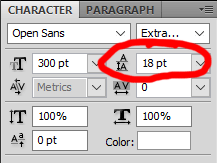
-
Printing a Flyer
Damien Symonds replied to Samantha_R's topic in Output - print, websites, Facebook, email, client disk, etc
Oh yep, ok. Just make sure it's a plain white gradient, NO blend modes. Yes, the black text will look less than black on your screen. Don't worry about it, it's just that it's hard to represent ink colours on a screen. However, if you wanted to add 10% cyan to the black text, that wouldn't do any harm. Now, may I suggest looking closely at the text itself. The punctuation is clumsy, and the spacing isn't very nice in my opinion. -
Just see the pinned "Posting Guidelines" post in the class posting area.
-
Printing a Flyer
Damien Symonds replied to Samantha_R's topic in Output - print, websites, Facebook, email, client disk, etc
"GIFT VOUCHER" is quite a bit darker now - is that ok? You had it very grey in your first design. -
Ha ha! Yes, you're not the first person who has said that. One does become rather uppity about photos, doesn't one?
-
Printing a Flyer
Damien Symonds replied to Samantha_R's topic in Output - print, websites, Facebook, email, client disk, etc
... but its opacity is lowered, yes? You need to create a replacement layer, at 100% opacity, to match it. And it must be made up ONLY of cyan and black, if at all possible. Maybe, if necessary, a tiny bit of magenta OR yellow, but NOT both. Text must be 100% black only. This is madness. The same as point one, you need to replace this with plain text at 100% opacity (none of this colour overlay nonsense) made up of ONLY black (presumably about 50%). No cyan, magenta or yellow. -
Printing a Flyer
Damien Symonds replied to Samantha_R's topic in Output - print, websites, Facebook, email, client disk, etc
Fantastic! Then most of the battle is already won. Ok, so I need some more info: What colour is the light blue "Color Fill 2" layer? I mean, what are its C M Y and K values? Likewise, what colour is the black text? What are its C M Y and K values? And what colour is the grey text at the bottom? -
Printing a Flyer
Damien Symonds replied to Samantha_R's topic in Output - print, websites, Facebook, email, client disk, etc
No, I mean the profile. -
Printing a Flyer
Damien Symonds replied to Samantha_R's topic in Output - print, websites, Facebook, email, client disk, etc
Have to go out for a bit. Will check in when I get back. -
Printing a Flyer
Damien Symonds replied to Samantha_R's topic in Output - print, websites, Facebook, email, client disk, etc
Yes, this is what I needed. They're dead right. So, the million-dollar question: Have you created this design in RGB or CMYK? -
Printing a Flyer
Damien Symonds replied to Samantha_R's topic in Output - print, websites, Facebook, email, client disk, etc
Thanks. You mentioned their recommendations for minimum text size. Did they also mention text colour? -
X-Rite i1 Display Pro
Damien Symonds replied to MarySmith's topic in Monitor calibration questions or problems
Yes, that was my next suggestion too. Get a handful more prints done, and see how they compare. -
Printing a Flyer
Damien Symonds replied to Samantha_R's topic in Output - print, websites, Facebook, email, client disk, etc
Ok. This should be straightforward, but do you mind showing me a screenshot so I can see your design and your layers panel, so we can be safe?