


Damien Symonds
-
Posts
212,718 -
Joined
-
Last visited
-
Days Won
3,521
Everything posted by Damien Symonds
-

Weird colour
Damien Symonds replied to Damien Symonds's topic in Miscellaneous questions or problems
Great! Then what I think doesn't matter. As you were. -
How did you go?
-
Gee, I think they pop plenty. I mean, they are the first part of the photo I see, my eye goes right to them. PLEASE don't wait too long to take The Raw Class.
-
Hi WGP, can you post here?
-
Weird colour
Damien Symonds replied to Damien Symonds's topic in Miscellaneous questions or problems
That's a really good selection of photos for calibration verification, well chosen. So they match (except for the red stripes). And do you like how they look? (This question is not relevant to calibration, by the way, I'm just interested.) -
Weird colour
Damien Symonds replied to Damien Symonds's topic in Miscellaneous questions or problems
Great, may I see all four? -
Weird colour
Damien Symonds replied to Damien Symonds's topic in Miscellaneous questions or problems
No, that's the photo you're working on now. I want the ones you've already printed - the ones you're comparing to verify your calibration. Jpeg files will do - they don't even need to be very big, you can reduce them in size. -
Weird colour
Damien Symonds replied to Damien Symonds's topic in Miscellaneous questions or problems
I have to take the kids to gymnastics now. I'll check back in later. -
Weird colour
Damien Symonds replied to Damien Symonds's topic in Miscellaneous questions or problems
Ok, that's excellent news. Do you mind sending me the files of the photos you're comparing? -
Weird colour
Damien Symonds replied to Damien Symonds's topic in Miscellaneous questions or problems
Ok. And after calibration, does the screen match your Bay prints exactly? -
Weird colour
Damien Symonds replied to Damien Symonds's topic in Miscellaneous questions or problems
Is it a new screen too? Or did you have the same Viewsonic attached to your old PC? -
Weird colour
Damien Symonds replied to Damien Symonds's topic in Miscellaneous questions or problems
And the screen? -
In the Table of Contents, you want Section 2, Module 2. Also, have you searched "Gradient tool" on my site?
-
Well, have you refreshed your memory on the gradient tool section of the Levels Class?
-
Hi @ShellyF, let's continue our discussion here. Can you remind me which Spyder you have, what screen you have, and which lab you use?
-
Ah. In that case, you'll need to find a sky-with-clouds photo and replace it.
-
John Oldham park maternity
Damien Symonds replied to Stacey Sedgman's topic in How to achieve a certain look or effect
Sorry, I can't discuss that here. I wouldn't mind discussing it in the class, though. -
John Oldham park maternity
Damien Symonds replied to Stacey Sedgman's topic in How to achieve a certain look or effect
Three, actually. Download my PSD -
Yes, that's right. Your focal plane looks pretty much perfect, and there's no motion blur. I think you did everything exactly right, within the capabilities of your camera in that light. Don't attempt to print this one until you've taken the Sharpening Class.
-
Obviously it's not great, but yes, it'll be passable.
-
Actually, I think that method will work ok. However, do you think your client is expecting some cloud detail in the sky? If so, it's going to be much harder.
-
John Oldham park maternity
Damien Symonds replied to Stacey Sedgman's topic in How to achieve a certain look or effect
Do you like it? I mean, is it something, at least? -
John Oldham park maternity
Damien Symonds replied to Stacey Sedgman's topic in How to achieve a certain look or effect
Yes, you'll find it when you search on my site. -
John Oldham park maternity
Damien Symonds replied to Stacey Sedgman's topic in How to achieve a certain look or effect
Still, with a vignette and a gradient map, you could create something? You'd need your normal levels and skin work too, of course.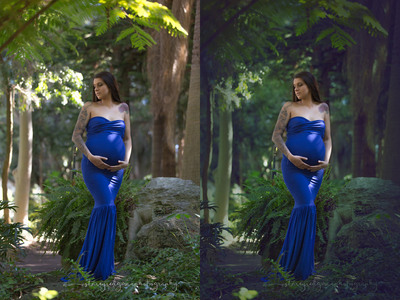
-
John Oldham park maternity
Damien Symonds replied to Stacey Sedgman's topic in How to achieve a certain look or effect
No doubt there has been extensive editing on that photo. You can see the big copy-and-flip. But it had the right "bones" to begin with.

