Damien Symonds
-
Posts
212,974 -
Joined
-
Last visited
-
Days Won
3,539
Everything posted by Damien Symonds
-
Generally I add a Solid Color layer on Multiply mode.
-
As I said, definitely not perfect. But an improvement, yeah?
-
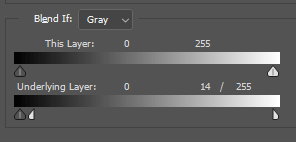
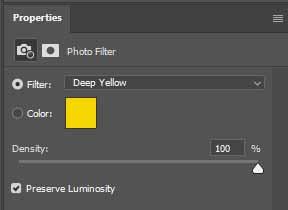
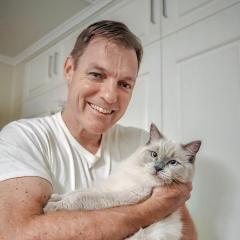
I do have something you could try. It's not perfect by any means, but I think it helps. Add a Photo Filter layer with these settings: Then go to the Blend If Sliders and split the white one on the Underlying Layer, and take it almost all the way to the other end. Then show me.
-
 Well, you'd lose your edits on those files, wouldn't you?
 -
Hmmm ... I think it should be there.
-
Do you have this turned on?
-
Yes, it should be easy enough.
-
Save as Jpeg
Damien Symonds replied to Mary Burgy's topic in Photoshop / Elements / Bridge / ACR questions or problems
https://www.damiensymonds.net/cantsaveasjpeg.html -
It's a jpeg file, not a raw file.
-
Perspectives then composite
Damien Symonds replied to Brink101112's topic in Questions about tutorials and articles
I'm so sorry, I don't understand what you're asking? -
Come on @Kiwiellis!
-
Why is this photo square?
-
Of course R +100, 0, 0, 0 G +100, 0, 0, -4 B +100, 0, 0, -4
-
Are you sure you need to remove it? Maybe just changing its colour would be enough?
-
How are you feeling about them?
-
I agree about gradient map, but you wouldn't start there I don't think. Do the darkening first. https://max.mailbigfile.com/0e30caf9b8b02b3c6f3dfe9797b1653d/listFiles.php
-
I agree, it's an in-betweener. So yes, I'd lean towards "Standard".
-
Any update on this, @Jbasya?
-
Touch Mouse options?
Damien Symonds replied to Joel's topic in Photoshop / Elements / Bridge / ACR questions or problems
I'm so sorry, I don't know. -
I don't know what PDF settings you chose, so I'm not sure if you're affecting the quality. But you shouldn't be.
-
It's great. Nobody will give it a glance.
-
PDFs are so important for commercial printing. But when all that's being printed is just an image, it's completely silly to demand PDF. Because the image will just be a jpeg file inside the added complexity of a PDF file. As you've just found out, it's too much extra that can go wrong. Not yet, sorry.
-
I guess you just have to copy the leg fur along.
-
Gee, don't be sad about that. ID is fantastic for this kind of work. But what about the dog photos? You didn't use ID for those, did you?
-
What about the calendars? Are they CMYK?